knowledgecenter-breadcrum

Knowledge Center

21 Aug, 2020

Simplify Agreement Booking Recurrence With One Click

Posted on 21 Aug, 2020 by Admin, Posted in Dynamics-365 Sales Dynamics 365 Field Service

Simplify Agreement Booking Recurrence With One Click Blogs

Simplify Agreement Booking Recurrence With One Click

Introduction

In Field Service, you can create work orders automatically by using agreements and the interval in which the work orders are created can be set up by using booking recurrence from the agreement booking setup, but this might be confusing and time consuming for clients/users, so in this blog we will see how you can configure the booking recurrence and keep it at just one click.
Dynamics 365 Field Service OOB functionality to setup Booking Recurrence


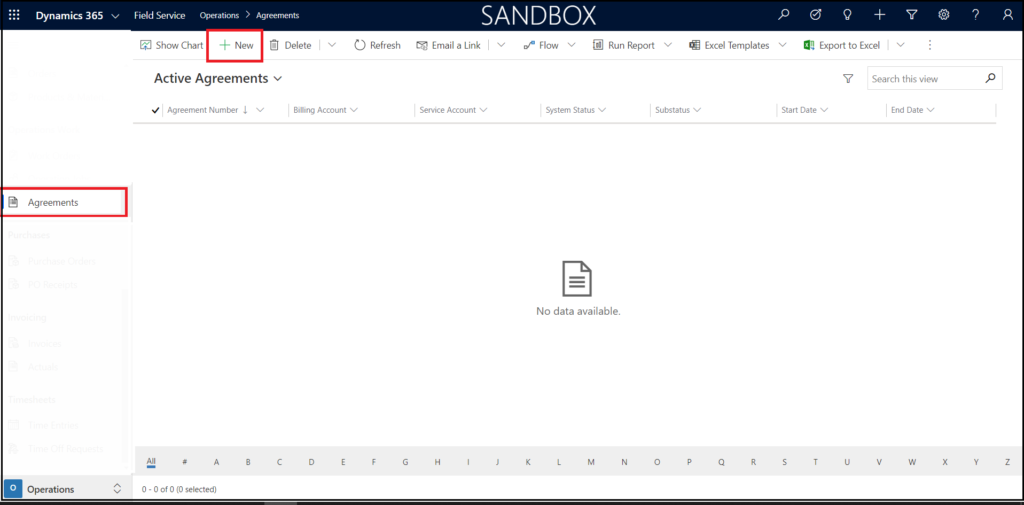
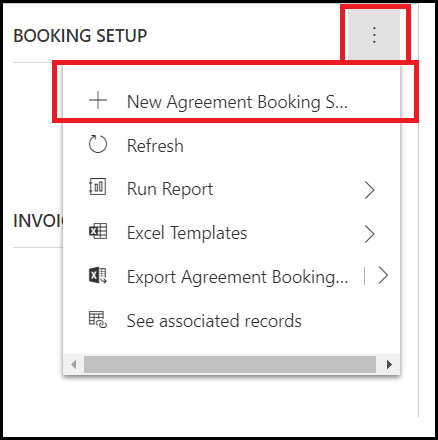
  • Go to Agreements > Agreement Booking Setup –> Booking Recurrence.
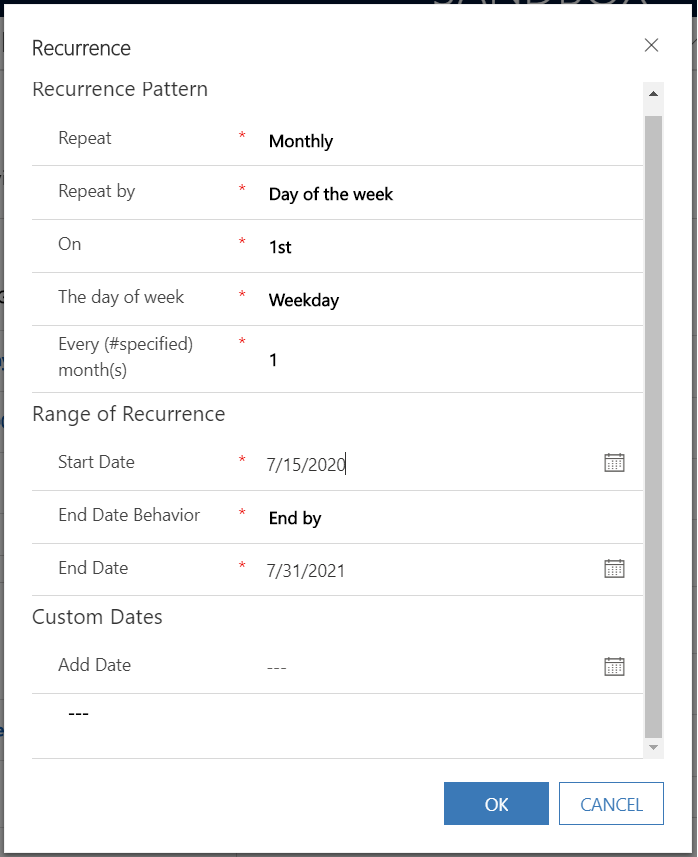
  • Once user clicks on the “BOOKING RECURRENCE” button, the following window is opened, where the user provides the required information.

  • The above Booking recurrence pattern is an example of Monthly recurrence which will create a Work Order on 1st weekday of every month from the Start Date to End Date.
  • A user will require too many clicks and need to set the proper patterns to achieve requirements, and this can be tedious for some users.

Simplified one click solution for Booking Recurrence

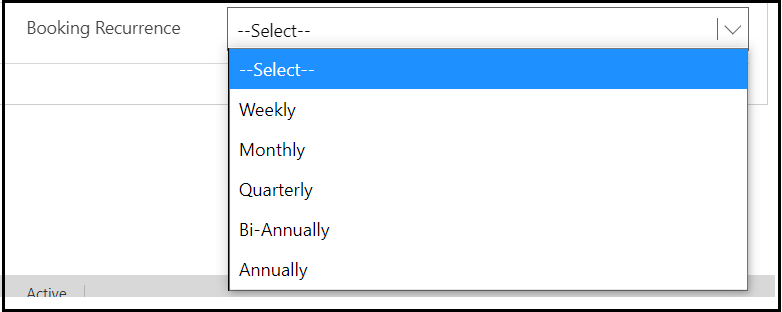
  • To make the above process simple for Users, you can make a custom Option Set field “Booking Recurrence” on the Booking Setup form with the most commonly used option values like: “Weekly”, “Monthly”, “Quarterly”, “Bi-annually” and “Annually” as indicated in the below picture.
  • You can also add this field on some other entity if you are using the other entity to create the Agreement.

  • And by selecting any one option from the above option set, the Booking Recurrence pattern is automatically generated. Based on the Booking Recurrence pattern, the Booking Date record gets created.

To achieve this follow the below steps:

  1. There is a “Recurrence settings” field on the Agreement Booking Setup form, but it is hidden. This field takes an xml string.
  2. You will need to set the XML string in the field to achieve the above functionality.
  3. Once the XML string is set the OOB Field service workflow is triggered and the booking recurrence is set

The structure of the XML string for most commonly used Booking Recurrence Pattern is given below:

For Creating Bookings Weekly:

var recurrenceSettingXml =
"weekly1 AGREEMENTSTARTDATE  AGREEMENTENDDATE "

For Creating Bookings Monthly:

var recurrenceSettingXml =
monthly17AGREEMENTSTARTDATE  AGREEMENTENDDATE "

For Creating Bookings Quarterly:

var recurrenceSettingXml =
"monthly17AGREEMENTSTARTDATE  AGREEMENTENDDATE "

For Creating Bookings Bi-Annually:

var recurrenceSettingXml =
"monthly17AGREEMENTSTARTDATE  AGREEMENTENDDATE "

For Creating Bookings Annually:

var recurrenceSettingXml =
"yearly1AGREEMENTSTARTDATE  AGREEMENTENDDATE "

Where,

  • AGREEMENTSTARTDATE– “Agreement start date” of Agreement record.
  • AGREEMENTENDDATE– “Agreement end date” of Agreement record.

So, to finally use this functionality and generate the XML string based on the selected option set value and set it to the Recurrence settings field. You can simply write a JavaScript code for generating the XML string

Use the following code snippet to assign the selected option set’s value to Recurrence settings field:

formContext.getAttribute(“msdyn_recurrencesettings”).setValue(recurrenceSettingXml);

Comment

This is a Required Field

Loading

Recent Updates

Blogs
31 Mar, 2026

Debugging Power Pages Server Logic Using Visual Studio Code

Power Pages Server Logic allows developers to execute secure backend JavaScript directly within Power Pages. It is commonly used for…

READ MORE
Blogs
31 Mar, 2026

Create and Deploy a Single Page Application (SPA) in Power Pages

In this blog, we’ll build and deploy a Single Page Application (SPA) using React + Vite and host it on…

READ MORE
BuildAndDeployPCF_Thumbnail.png
Blogs
25 Mar, 2026

Build And Deploy Your First Dataset PCF Control In Dynamics 365

Introduction In Dynamics 365, subgrids are commonly used to display related records, such as Opportunities under an Account. While out-of-the-box…

READ MORE