knowledgecenter-breadcrum

Knowledge Center

27 Apr, 2022

Search within current view in Dataverse

Posted on 27 Apr, 2022 by Admin, Posted in Dataverse Dynamics 365 Dynamics-365 Sales

Search within current view in Dataverse Blogs

Search within current view in Dataverse

Introduction:

New feature is added to dynamics 365 which allows you to search for a record in the current view only.

In this blog, I am going to explain how to limit the search to the current view only.
Step-by-Step:

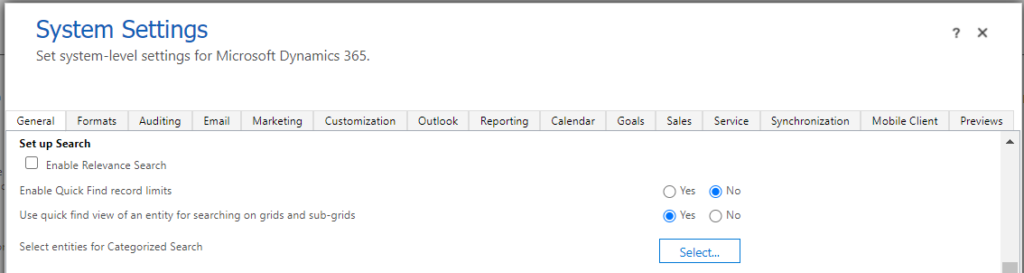
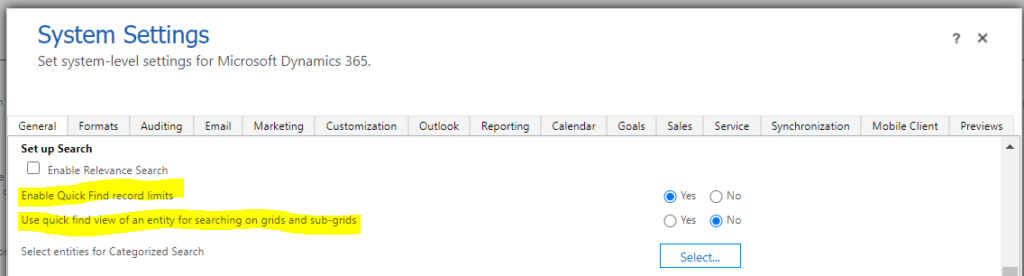
  1. Go to Settings -> Administration -> System Settings -> General. Find “Set up Search” heading on the general page.
  2. You will see, “Enable Quick Find record limits”. If you set it to “Yes” and below option to “No” then the search functionality will search for the records from the current view.
  3. And if you set “Enable Quick Find record limits” to “No” and below option to “Yes” then the search functionality will search for the records from the Quick Find View.

Comment

This is a Required Field

Loading

Recent Updates

Blogs
01 Oct, 2026

Catch Blocks That Actually Catch: Logging Failed Steps in Power Automate

Introduction Most teams building Power Automate flows eventually land on the same pattern: wrap your business logic in a Scope,…

READ MORE

Blogs
01 Oct, 2026

Automatically Refresh a PCF Dataset Grid After Closing a Custom Page in Dynamics 365

Introduction Custom Pages provide a modern way to edit records in Dynamics 365. A common approach is to open a…

READ MORE
Blogs
23 Sep, 2026

How to Dynamically Switch Business Process Flow When Changing Forms in Dynamics 365

How to Dynamically Switch Business Process Flow When Changing Forms in Dynamics 365 Introduction Microsoft Dynamics 365 provides powerful customization…

READ MORE