
07 Apr, 2022
Posted on 07 Apr, 2022 by Admin, Posted in Dynamics 365 Power Apps Power Platform Dynamics-365 Sales
 Blogs
Blogs
In this blog, we are going to learn how to set a scheduled flow to run on specific dates of a month.
We all know that a scheduled flow can be set to run based on a day/weekly at a specific time of the day. But making it run only at particular dates of a month is challenging and many of us don’t know that.
Suppose we have a scheduled flow which we want to run on 1st, 15, 16, 30, or 31 (end of the month) and repeat every month.
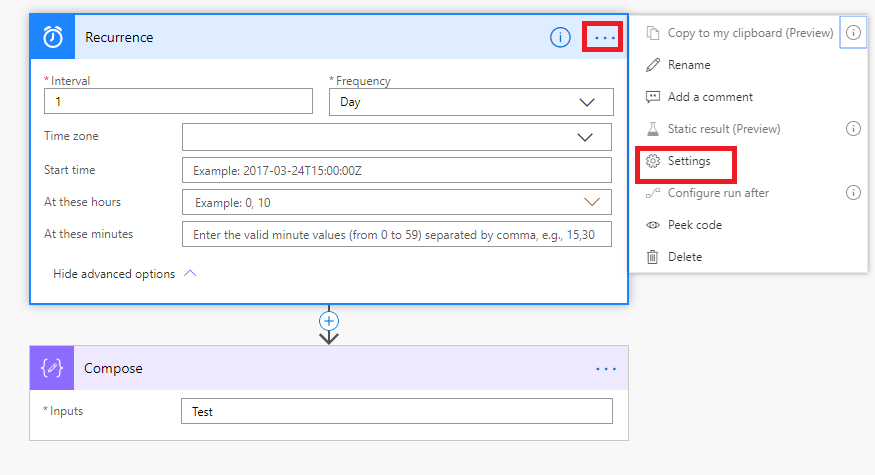
Step 1: Use Recurrence as a trigger and set it to trigger once a day, click on three dots to the left then click on Settings.
Step 2:  Set the trigger conditions to
@or(equals(utcNow('dd'), '01'),equals(utcNow('dd'), '15'),equals(utcNow('dd'), '16'),equals(utcNow('dd'), '30'),equals(utcNow('dd'), '31'))
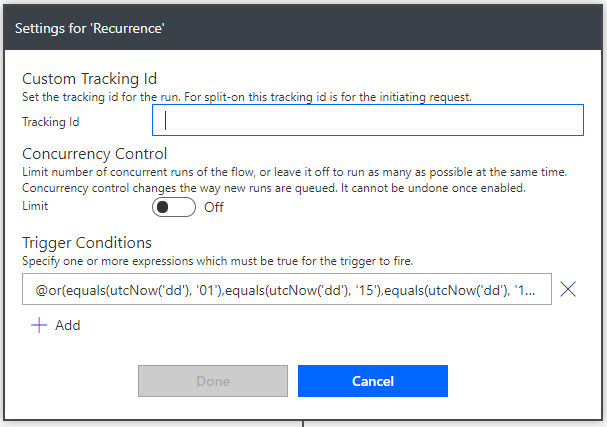
That’s all, now your flow will run at 1st, 15th, 16th, 30th, or 31st every month at 10 am.
Comment
When working with multiple environments in Microsoft Dataverse (DEV, TEST, PROD), hardcoding the environment URL inside Power BI Desktop creates…
READ MORE
Introduction In Power Apps, even a small mistake during deployment can impact users and business processes. This checklist will help…
READ MORE
Introduction: In Model-driven apps, PCF controls are typically embedded inside forms or views. However, unique business requirements often demand more…
READ MORE