
15 Mar, 2022
Posted on 15 Mar, 2022 by Admin, Posted in Dynamics-365 Sales Dynamics 365
 Blogs
Blogs
Recently, we had a requirement to update a field on opportunity record whenever an opportunity was closed as won.
My first thought was that it was pretty straightforward and registered the plugin using this step:
But it did not fire the plugin when opportunity was closed as won, and I was thinking why?
After a bit of research I found that I instead needed to use the following:
But this does not return opportunity as “Target” as you might think, it actually returns “Status” and “OpportunityClose” .
OpportunityClose contains the information listed on the form displayed when you try to Win/Lose an Opportunity, CRM stores this as a separate entity.
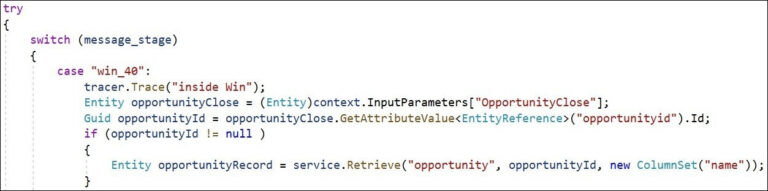
As you can see we can get opportunintyid from the entity.
We can use it retrieve the opportunity record and perform desired operation on it.
Comment
Introduction Most teams building Power Automate flows eventually land on the same pattern: wrap your business logic in a Scope,…
READ MORE
Introduction Custom Pages provide a modern way to edit records in Dynamics 365. A common approach is to open a…
READ MORE
How to Dynamically Switch Business Process Flow When Changing Forms in Dynamics 365 Introduction Microsoft Dynamics 365 provides powerful customization…
READ MORE